
7 best Bluebeam alternatives for commercial and specialty contractors

Your field tech opens their iPad, sees the Bluebeam Revu app sunset notice, installs the replacement, and finds Bluebeam Cloud at 1.7 stars on the App Store. Multiply that across every crew member on every jobsite.
That friction is one reason contractors compare Bluebeam alternatives. Per-user costs climbing toward $440/user/year, no change order tracking or budget oversight, and a Windows-only desktop app all add to the pressure.
None of this erases what Bluebeam does well. It remains one of the strongest PDF markup tools in commercial construction, but for some teams the gaps can outweigh the strengths.
What this article covers:
- Bluebeam's strengths are PDF markup and Excel-fed takeoffs; its gaps are Windows-only access, per-user pricing, a weak mobile app, and no native project controls workflows.
- The right alternative depends on the one or two gaps you actually hit, not on total feature count.
- Each alternative covers a different gapGeneral PDF editors like Adobe Acrobat and Foxit are left out because they generally lack calibrated scale and construction jobsite workflows.
- Pilot any alternative alongside Bluebeam on one live project for two to four weeks before committing.
Why commercial contractors search for Bluebeam alternatives
Contractors usually start with a specific Bluebeam gap. Knowing where Bluebeam leads and where it falls short helps you pick the right alternative instead of trading one set of problems for another.
Where Bluebeam still leads
Bluebeam's calibrated scale tools, custom hatch patterns, and reusable Tool Chest remain strong for PDF markup. The Complete tier gives estimators a direct path from measurement to Excel, and Batch Link and Batch Slip Sheet are built for high-volume document processing.
Where Bluebeam leaves gaps
Four gaps come up most often:
- Windows-only architecture. Bluebeam Revu requires Windows, so Mac users typically need Parallels or Boot Camp. Some users also report performance issues with large files, including crashes, in G2 reviews.
- Per-user pricing at large scale becomes costly. Plans run about $260 to $440/user/year. A 10% price increase took effect June 2024.
- Limited mobile access. Revu for iPad was retired from the App Store at the end of 2025. Its replacement, Bluebeam Cloud, is rated 1.7/5 on the App Store, which creates friction for field teams.
- No native project controls. Bluebeam offers no change order tracking or budget oversight. Its September 2025 Procore integration press release aimed to "eliminate data silos."
The pricing gap is the easiest to put a number on. For a 25-person team, Bluebeam Complete costs about $11,000 per year at Bluebeam's listed annual per-user rate, before adding a separate PM platform for RFIs and submittals.
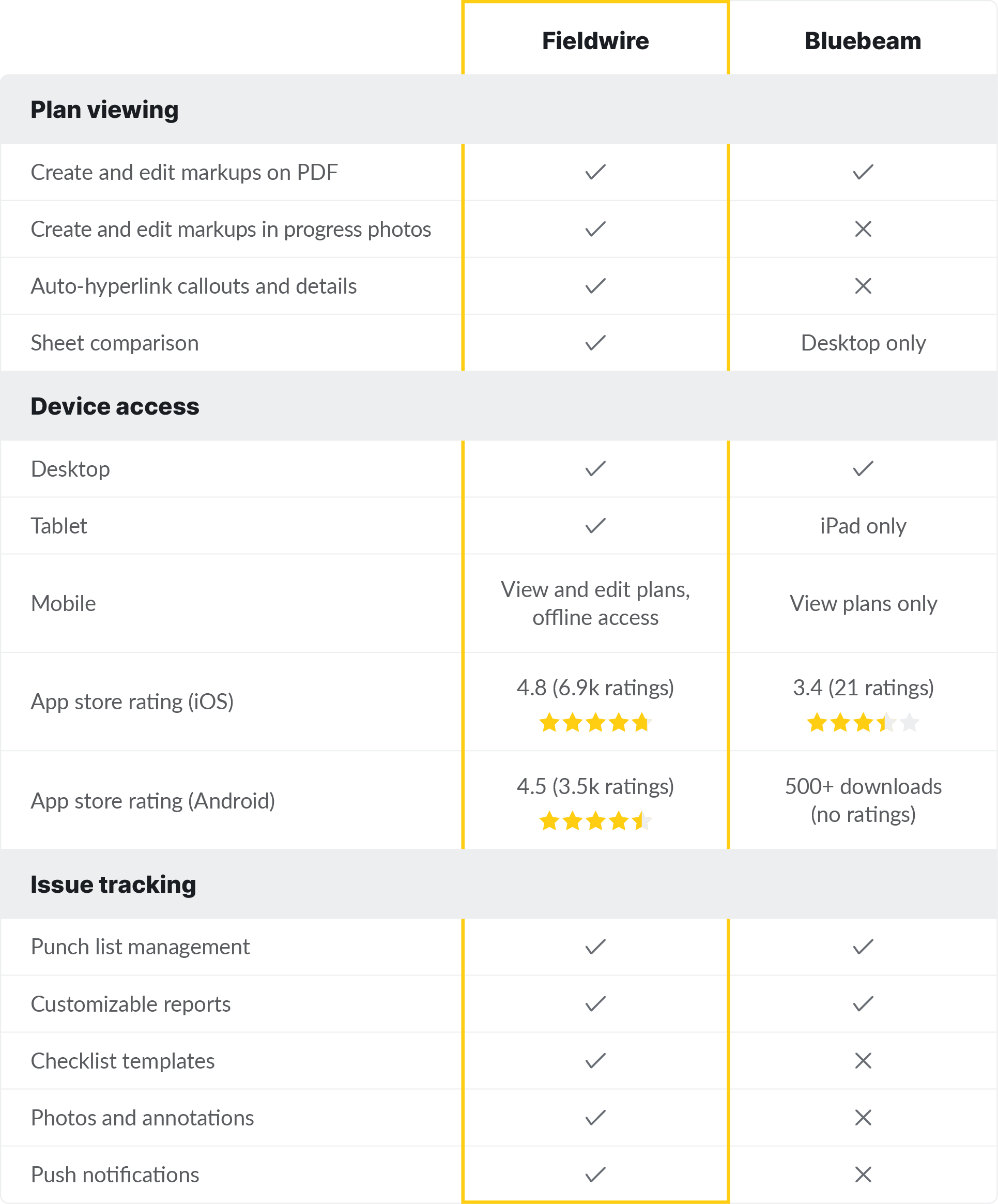
Match the alternative to your biggest gap
Most contractors hit one or two specific walls with Bluebeam. Start by identifying which one applies to you. Some teams need better mobile access and jobsite management, others need broader project oversight, dedicated takeoffs, BIM coordination, or faster drawing comparison at scale. Fieldwire is built for the first case: mobile-first access and day-to-day jobsite management. For the others, Procore and Autodesk Construction Cloud cover broader project oversight, PlanSwift and STACK cover takeoffs, Revizto covers BIM coordination, and Bedrock covers high-volume drawing comparison.
The 7 best Bluebeam alternatives for commercial and specialty contractors in 2026
Each platform below targets a different Bluebeam gap. Use the contractor-profile note in each section to find the closest fit for your team.
Fieldwire is best for mobile jobsite management
Fieldwire is a field-first construction platform built for trade and specialty contractors on commercial projects. It covers plan viewing, task management, punch lists, inspections, and photo documentation tied directly to drawings. The platform runs on iOS, Android, and web, with full offline support on mobile, so crews in basements and tower cores stay productive without a signal. Because it's built around the daily work of foremen and superintendents on site, it's a strong option when your biggest problem is getting current plans, tasks, and photo documentation into your crew's hands.
Key features
Tasks pin directly to plan locations so field crews see exactly what needs doing and where on every sheet. Hyperlinked plans with automatic version control keep every crew member on the current revision, and photo documentation attaches directly to tasks for a full visual record. Sheet compare highlights changes between plan versions so crews see what's new on a revision (Pro and above). The offline-first setup stores plans and tasks locally on mobile, and updates when connectivity returns.
Pros
- G2 reviewers frequently mention ease of use as a key theme
- Fieldwire supports offline work on mobile, and updates sync automatically once the device reconnects
Cons
- Markup capabilities vary by platform and workflow
- RFIs, submittals, change orders, and budget tracking are gated to the top Business Plus tier ($89/user/month, billed annually); lighter tiers focus on field execution
Pricing
Pricing starts free (Basic: five users, three projects). Pro: $39/user/month. Business: $64/user/month. Business Plus (adds RFIs, submittals, change orders, budget): $89/user/month. All billed annually. Unlimited pricing available upon request.
Who Fieldwire is best for
Trade and specialty contractors whose primary Bluebeam frustration is mobile access and field execution. It's also a strong fit for teams that want field-first jobsite management instead of a heavier office-first system.
Procore
Procore is an enterprise construction management platform covering the full project lifecycle from preconstruction through closeout: RFIs, submittals, change orders, budget, financials, document control, and field coordination. Its unlimited-user pricing model removes per-seat fees, so every subcontractor and stakeholder can get access without adding license costs.
Key features
Procore's RFI and submittal workflows route documents through configurable approval chains with full audit trails. Drawing management includes version control with markup capability linked to coordination issues. Daily logs, budget tracking, change order management, and ERP integrations give GCs financial oversight alongside field coordination in one platform.
Pros
- Across thousands of G2 reviews, reviewers frequently cite Procore's centralization, a single source of truth for drawings, RFIs, and submittals
- Unlimited-user pricing on all plans removes per-seat fees for large teams and subcontractors
Cons
- Steep learning curve is a recurring theme on both G2 and Capterra
- No published pricing. All plans are custom-quoted based on Annual Construction Volume and selected modules
- Heavier than single-trade specialty contractors typically need if they only require field execution and plan viewing
Pricing
Custom-quoted based on Annual Construction Volume and selected modules. See Procore pricing.
Who Procore is positioned for
GCs needing a full project management platform across RFIs, submittals, financials, and document control. Fieldwire is often a closer fit for GCs who need fast field adoption and more customizable workflows based on the project or division.
Autodesk Construction Cloud
Autodesk Construction Cloud is Autodesk's construction platform for document management, field execution, and cost management. Autodesk has expanded Forma branding across related offerings, and PlanGrid is no longer sold as a standalone product, with its capabilities folded into Autodesk Build. For teams already using Revit, AutoCAD, or Civil 3D, the platform supports design-to-construction workflow continuity.
Key features
Autodesk Build handles RFIs, submittals, daily reports, quality tracking, and cost management in a single module. The design-to-field data path connects model information from tools like Revit and AutoCAD with construction workflows, which can help teams reduce rework across project phases.
Pros
- On G2, reviewers frequently praise ease of use and collaboration, citing a single source of truth for project data
- Forma Data Management Essentials is included at no cost with standalone AutoCAD, Revit, and Civil 3D subscriptions
Cons
- G2 reviews also surface recurring complaints about missing features and platform limitations
- Accessing Autodesk Construction Cloud files from a local machine typically requires Autodesk Desktop Connector, an extra component to install and maintain
- Per Autodesk, PlanGrid is no longer available for purchase by new customers, so teams have had to move to Autodesk Construction Cloud and Autodesk Build
Pricing
Forma Data Management starts at $500/year per G2. Full module pricing requires direct consultation at construction.autodesk.com.
Who Autodesk Construction Cloud is positioned for
Teams already in the Autodesk design ecosystem that need design-to-construction data continuity. Trade contractors looking for fast field adoption may find Fieldwire quicker to roll out.
PlanSwift
PlanSwift is a dedicated takeoff and estimating application for Windows desktop. It handles area, linear, and count measurements with Excel integration. As one Reddit estimator put it: "PlanSwift is a takeoff software, Bluebeam is a PDF editor that supports takeoffs."
Key features
Assembly-based takeoffs let estimators build reusable templates with labor, material, and tax calculations baked in, then apply them with a point-and-click digitizer workflow across PDF plan sets. That estimator-first workflow is part of why a practitioner on Bluebeam's own forum described PlanSwift's takeoff UI as more intuitive than Bluebeam's.
Cons
- Windows desktop only. No mobile app, no cloud access, no real-time collaboration
- Advanced tools including detailed reporting require additional purchases beyond the base subscription
- No punch list, task management, or field coordination capabilities
Pricing
PlanSwift Professional Subscription: $2,000/year. 14-day free trial, no credit card required. See planswift.com.
Who PlanSwift is positioned for
Estimators at specialty contractors whose primary Bluebeam use is quantity takeoff. You'll need a separate platform like Fieldwire for field plan access and task management.
STACK
STACK is a cloud-based takeoff and preconstruction platform that runs entirely in the browser with no installation required. It offers a free version of Takeoff & Estimate.
Key features
Teams can search drawing sets to find specific details faster. Beyond search, pre-built and custom assemblies with regional pricing data connect takeoff quantities directly to cost estimates and proposals.
Cons
- Cloud-only means no offline access
- G2 reviewers report multi-device access limitations and incomplete task continuity
- Paid plans start at $249/user/month billed annually, higher than PlanSwift for single-user workflows
Pricing
Free version available for Takeoff and Estimate. Paid plans start at $249/user/month billed annually.
Who STACK is positioned for
Preconstruction teams wanting cloud-based collaborative takeoff and estimating. Pair with Fieldwire for field plan access and mobile task management.
Revizto
Revizto is a BIM coordination platform for 3D model-based clash detection and issue tracking. It consolidates models from Revit, Navisworks, ArchiCAD, and other BIM tools into a single shared environment where all disciplines can review, track, and resolve coordination issues.
Key features
Revizto automates clash detection with auto-generated issues assigned by trade, priority, and zone based on configurable rules. The 2D/3D overlay and splitview lets team members who don't use BIM software access and interact with the model directly. G2 reviews point to Revizto's value as a single platform for team members to access and work within the model.
Cons
- Limited API and integration capabilities come up as a recurring dislike in G2 reviews
- Revizto itself states it has no publicly available pricing
- Supports markups that can be exported to PDF, but its broader coordination workflows differ from Bluebeam's 2D PDF-centric tools
Pricing
No published pricing. All plans require direct sales consultation.
Who Revizto is positioned for
Projects with active BIM coordination programs across multiple disciplines. Revizto doesn't cover day-to-day field execution or plan distribution, so trade crews often run Fieldwire alongside it for mobile plan access, tasks, and punch lists.
Bedrock
Bedrock is a drawing comparison tool used in construction workflows. It automates drawing-set comparison and cuts manual review time.
Key features
Change reports can be organized by category and sent out per trade, with categories used to track disciplines and responsibilities. Bedrock reports that its AI reads text on drawings at 95% accuracy.
Cons
- Bedrock's materials emphasize text-reading accuracy more than spatial-content understanding
- Comparison-only tool with no markup, task management, or field coordination features
Pricing
Usage-based pricing. Run a pilot before committing.
Who Bedrock is positioned for
Teams managing high-volume drawing revisions across large commercial projects, often alongside Fieldwire for field execution and task tracking.
Alternatives we deliberately excluded
These tools come up in searches but don't meet the bar for a construction takeoff or jobsite workflow. Adobe Acrobat Pro, Foxit PDF Editor, and Nitro PDF are general-purpose PDF editors that generally lack the calibrated scale measurements and construction jobsite workflows the alternatives above are built around.
How to test an alternative before switching
Run the alternative alongside Bluebeam on one live project for two to four weeks. Fieldwire's free Basic tier (five users, three projects) makes this a low-risk test. Focus on the workflows your crew touches daily: plan viewing, markup, punch lists, photo documentation.

Start with the gap you need to close
Most commercial and specialty contractors need to fill one or two specific Bluebeam gaps. Fieldwire addresses a common one: mobile-first plan viewing, offline access on mobile, task management, punch lists, and photo documentation tied directly to drawings. For teams that need field-first jobsite management their crews can adopt quickly, it's one option worth testing. The free Basic tier lets five users test these workflows on three live projects before committing.
Bluebeam still leads for desktop PDF markup precision, calibrated takeoffs feeding into Excel, and batch document processing. Most contractors will keep Bluebeam for what it does well and add one tool for what it doesn't.
Frequently asked questions about Bluebeam alternatives
Bluebeam Revu is Windows-only. Mac users can run Revu through Parallels. Fieldwire and STACK work natively on Mac without virtualization.
For field execution, plan viewing, task management, and punch lists, yes. For calibrated desktop takeoffs and batch document processing, Bluebeam still leads.
Fieldwire's Basic tier is free for five users, three projects, and 100 sheets. STACK offers a free Takeoff and Estimate tier in the browser. Bedrock includes 50 free comparisons to start.


