
The best construction management software for small contractors who've outgrown spreadsheets

The GC's closeout walkthrough is tomorrow and nobody can find the punch item your foreman called in from the third floor last Tuesday. It's in a text thread, or a photo on someone's phone, or a sticky note in the trailer. You've hit the ceiling of what spreadsheets, group texts, and paper can track, but the platforms built for office-based project managers carry price tags and learning curves that don't match how your crew actually works in the field.
You need construction management software sized to a small trade or specialty contractor: field-first, easy to adopt, and focused on the coordination gap that's actually hurting you.
What this article covers:
- Where spreadsheets break down on a jobsite, and the six failure modes to watch for
- The five capabilities that matter most when picking a replacement
- How Fieldwire, Procore, Buildertrend, Raken, and Autodesk Construction Cloud compare on the specifics
- A rollout approach that holds up in the field, with a pilot and a clear switchover date
- How to match the decision to the workflows spreadsheets are failing to support
Where spreadsheets break down on a jobsite
Spreadsheets work fine when one person owns the file and updates run on an office desktop, but a jobsite breaks every one of those assumptions. The work being asked of the spreadsheet has moved off the desk and into the field, and the file format hasn't caught up.
Here's what actually fails when a small contractor tries to run coordination through Excel or Google Sheets:
-
No link between a task and a location on the plan. A row that says "fix the cracked tile, Room 312" is a description. Software lets you pin that task to the exact spot on the current drawing, so the next person finding it doesn't have to interpret anyone's shorthand.
-
No version control on drawings. When the architect issues a revision, spreadsheets don't know. Crews keep working off last month's PDF until someone catches it. Plan-based software replaces the old sheet, flags what changed, and keeps prior versions retrievable.
-
No offline-with-sync behavior. A shared sheet in a basement or a parking structure either fails to load or saves a conflicting copy. Field apps work offline by design and reconcile on reconnect.
-
No audit trail. Who updated the punch item, when, and with what photo attached? Spreadsheets overwrite silently, while jobsite platforms timestamp every change and tie it to a user.
-
No real-time visibility. If the PM wants to know what's open on floor three, a spreadsheet requires someone in the field to stop, update the file, and save. A platform shows current task status to anyone with access the moment it changes.
-
No structured photo attachment. Photos live on phones, in texts, in email threads, with the connection between the photo and the issue it documents held together by memory. Software attaches the photo directly to the task record.
-
No ownership or accountability. Assigning a task in a spreadsheet means typing a name in a cell. There's no notification, no acceptance, and nothing stopping a task from sitting unassigned or unclaimed until someone happens to scroll past that row. Software assigns a task to a person, notifies them, and makes open ownership visible to everyone else on the job.
If your crew is working around any three of these limits, you're past what a spreadsheet can support. The rest of this guide covers what to evaluate in a replacement.
What to look for when spreadsheets won't cut it
The six capabilities below map directly to the spreadsheet failures above. If your biggest pain is field coordination, field-first construction management software like Fieldwire is usually a better starting point than a finance-heavy system.
-
Mobile-first design that works offline. The spreadsheet fix for dead zones is "update it when you get back to the trailer," which means half the day's information gets lost or misremembered. The app should function offline and sync when connectivity returns.
-
Plan viewing and markup with version control. The spreadsheet equivalent is emailing PDFs and hoping everyone opens the latest one. You need current plans on any device with markup, version compare, and photo attachment at the point of the issue.
-
Task management and punch lists tied to plan locations. A spreadsheet row can describe a task, but it cannot pin it to a coordinate on the drawing or push a notification when status changes. A structured task tracker with assignments, due dates, location pins, and status updates helps reduce items falling through cracks.
-
Ease of adoption. If your foreman can't figure it out in 30 minutes, he's going back to his notebook, and you'll be back to the spreadsheet within a week.
-
Transparent pricing. You should be able to evaluate costs before sitting through a sales pitch.
-
Assignment with accountability. A spreadsheet cell can hold a name, but nothing notifies that person or confirms they've seen the task. You need software that assigns work to a specific person, pushes a notification the moment it's assigned, and makes open or unclaimed items visible to everyone else on the job, not just the person who typed the row.
Use these six as the filter for every platform you evaluate. The next section walks through how the major options hold up against them.
The best construction management software for small contractors
Here's how the top options stack up for small commercial trade and specialty contractors moving off spreadsheets for the first time.
Fieldwire by Hilti
Fieldwire is a mobile-first jobsite management platform built for field teams, and it sits in the Hilti Construction Software portfolio. The platform is built around plan management, task tracking, punch lists, and inspections, the workflows field crews actually run every day, rather than the financial modules most field users never touch. It's used across both small crews and larger project teams, with a free tier that lets you evaluate it on a real project before committing.
Key features
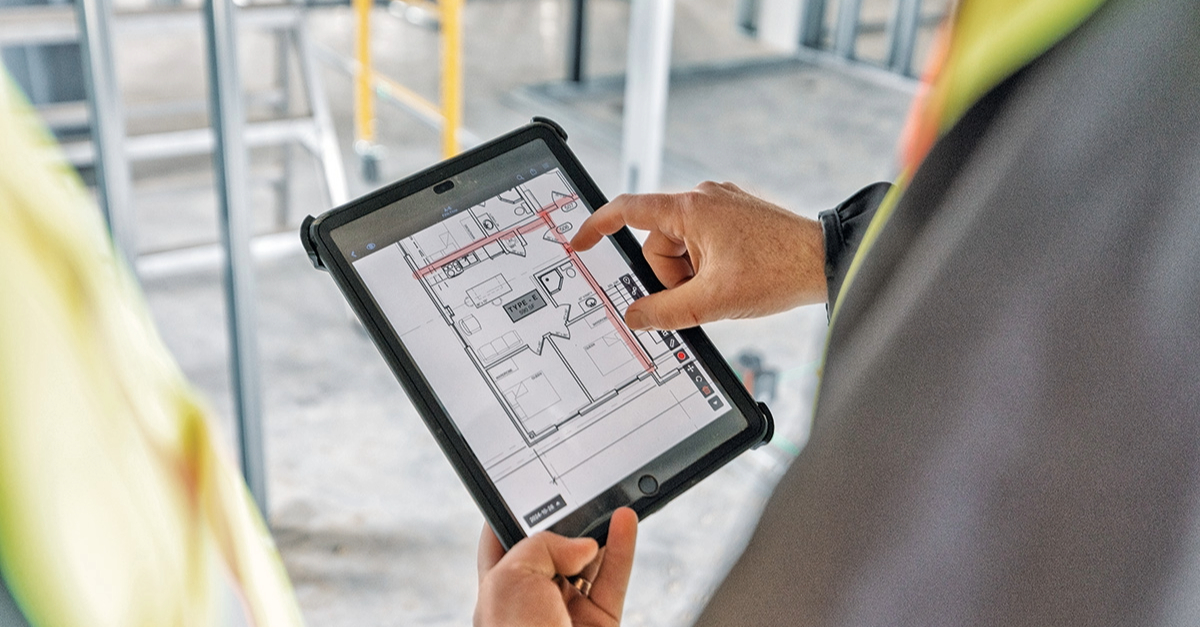
Plan management includes automatic version control, markup tools, and sheet compare to keep crews on the latest drawings without the rework that comes from working off outdated sets. Tasks can be created and assigned directly on plans with location pins, photos, and checklists, so field issues get captured in context instead of lost in email threads.
The mobile app supports punch lists, inspections, and as-built documentation, with full offline access and automatic sync when connectivity returns, which keeps crews productive on sites where cell service is unreliable.
Pros
- Fast field adoption. Field crews pick it up quickly, with minimal training needed for non-technical staff. That means shorter ramp-up time and lower internal labor cost during rollout.
- Built for how jobsites actually work. The offline-capable mobile app keeps crews productive in basements, low-connectivity sites, and remote projects, where office-first platforms often stall.
- Transparent, predictable pricing. Tiered pricing starts with a free plan, so you can evaluate costs and field fit before talking to sales.
- Backed by Hilti. Part of the Hilti Construction Software portfolio, which means long-term investment, ongoing development, and connections to a broader set of construction tools.
- Track record. Over 4,000,000 projects have run on the platform across contractors of every size.
Cons
- Performance on unusually large drawing sets is an area of continued improvement, with regular platform updates working on load times.
- Fieldwire is focused on field workflows rather than accounting or estimating, so teams that need deep job costing typically pair it with a dedicated financial system, which is standard practice across the industry.
- Limited customization
Pricing
A free Basic tier covers up to five users and three projects, and paid plans range from $39 to $89 per user per month billed annually, scaling with features. That's a tight, published range you can budget against, which is rare in a market where most bundled platforms hide pricing behind sales calls.
Who is Fieldwire best for?
Small-to-mid trade and specialty contractors, general contractors, and project teams whose priority is strong field documentation, plan management, and crew coordination. If job costing is your primary need, Fieldwire works well alongside an accounting system, so you get strong field execution paired with the financial platform your office already uses.
Procore
Procore is a widely adopted platform in construction, covering project execution, financials, document management, and field tools in a single system. Pricing is based on annual construction volume (ACV), not per-seat licensing.
Key features
Procore combines RFIs, submittals, budget tracking, daily logs, and drawing management in one platform. Its financial tools cover budgeting, owner invoicing, commitment tracking, and cost forecasting. The mobile app lets field crews capture daily logs with photos, track time, and access drawings from the jobsite.
Pros
- RFIs, submittals, budgeting, and document storage live in one platform for office-based PMs, with G2 reviewers noting field adoption depends heavily on platform familiarity
- Contracts include unlimited users, though reviewers on G2 note the ACV-based total cost typically lands above per-seat platforms for smaller teams
- Mobile time-tracking lets crews log hours from the field, though reviewers on Capterra describe the broader mobile experience as heavy for crews coming from simpler tools
Cons
- Pricing is not publicly listed and requires a sales conversation based on annual construction volume.
- Smaller firms sometimes describe the system as slow or hard to use.
- The platform's depth can feel like more than a small team needs if you're only looking for core field tools.
- Steep adoption curve
Pricing
Procore does not publish specific dollar pricing. Costs depend on the products selected and your annual construction volume, so you'll need to request a quote directly.
Who is Procore best for?
Larger contractors or firms needing deep financial management alongside field tools. For most small contractors, the cost and depth of features make adoption a heavy lift, and many small subs on Procore-led jobs keep a field-first tool like Fieldwire for day-to-day plan access, punch lists, and offline work.
Buildertrend
Buildertrend is built for residential home builders and remodelers, covering job coordination, financials, and client communication. Its homeowner-facing client portal is a core differentiator in the residential segment.
Key features
The financial and client management suite includes estimates, bids, budgets, job costing, invoicing, and a homeowner-facing client portal. The platform integrates with accounting tools including QuickBooks and Xero. Change order management, selection tracking, and timeline management give residential contractors a single workflow from pre-construction through closeout, and the client portal lets homeowners view progress and stay informed, reducing back-and-forth communication.
Pros
- Centralizes project information, financials, and client communication for residential workflows, though G2 reviewers note the platform's design center remains residential rather than commercial construction
- Users cite strong customer service and broad feature coverage, though Capterra reviewers flag notification volume as a recurring friction point
- Subscription plans include user access without per-seat charges; confirm current terms before signing
Cons
- Pricing is not publicly listed and requires a sales conversation.
- Some users report slow load times, cumbersome navigation, and occasional crashes.
- Residential focus limits effectiveness for commercial work.
Pricing
Buildertrend does not publicly list specific tier prices. The pricing page directs prospective buyers to sales, and annual billing may reduce the effective price. Confirm user packaging and trial availability directly with Buildertrend before purchase.
Who is Buildertrend best for?
Trade contractors working primarily in residential new construction or remodeling. Commercial trade contractors and specialty subs generally find Buildertrend's residential orientation a poor scope match, and choose a field-first commercial tool like Fieldwire instead.
Raken
Raken is a field-first daily reporting and documentation tool rather than a full construction management platform. It focuses on daily logs, time tracking, and safety documentation.
Key features
The platform captures real-time field updates with photos, crew activities, and notes, then syncs to the office. Time cards, manpower logs, safety forms, and toolbox talks are built in, with timestamps and digital signatures that support a consistent audit trail for field records. Field data syncs to the office automatically, reducing manual report assembly.
Pros
- Users cite ease of use for non-technical field staff on daily reporting workflows, though G2 reviewers note the strength is concentrated in reporting rather than full plan-and-task workflows
- Customer support is commonly described as responsive and knowledgeable
- Cost-effective for contractors whose primary need is daily reporting, though Capterra reviewers note compliance-critical features like time tracking and RFIs sit behind the higher Performance tier
Cons
- Plan management and punch list depth are lighter than in field coordination platforms built around drawings.
- Pricing is not publicly listed and requires contacting sales.
- Per-user cost may be hard to justify for very small crews of one to five people.
Pricing
Raken does not publicly list pricing, and subscriptions are quoted based on usage needs. Contact Raken directly for a quote.
Who is Raken best for?
Contractors whose biggest pain point is getting daily reports, time cards, and safety documentation off paper and into a consistent digital format. Teams whose bigger field pain is "we keep building off old drawings" typically pair or replace Raken with a field-first jobsite platform like Fieldwire that includes drawing version control and plan-based task tracking alongside daily reporting.
Autodesk Forma
Autodesk Forma is Autodesk's unified construction platform, announced in November 2019 and bringing together PlanGrid, BuildingConnected, Assemble, and BIM 360. Autodesk Forma Build was later launched by combining capabilities from PlanGrid and BIM 360. The platform connects directly with Autodesk's design ecosystem, so project data flows between Revit or AutoCAD and field tools.
Key features
Document management with version control, RFI and submittal workflows, meeting management, and machine learning-based risk analysis. Quality and safety checklists with customizable forms let teams track issues and inspections from the field. Cost management covers budgets, change orders, and forecasting.
Pros
- Strong Revit and AutoCAD alignment for teams already in the Autodesk design ecosystem, though G2 reviewers note benefits land most clearly for teams already standardized on Autodesk tooling
- Some users highlight ease of use once teams are onboarded, though reviewers on Capterra frequently cite a long learning curve and a UI that field users find dense
- A 30-day free trial of Autodesk Build is available for evaluation
Cons
- Geared toward large contractors with less focus on small contractors or tenant improvement work.
- Pricing is not publicly listed, and users sometimes describe the platform as complex and relatively expensive compared with alternatives.
- Teams transitioning from simpler platforms often require dedicated onboarding.
Pricing
Autodesk does not publish specific pricing. Pricing is described as flexible across user, project, and account-based models and directs buyers to sales. A 30-day free trial of Autodesk Forma Build is available.
Who is Autodesk Forma best for?
Firms already invested in the Autodesk design ecosystem that want a connected workflow from design to field. PlanGrid is no longer available for purchase by net-new customers; Autodesk Forma Build was developed by combining capabilities from PlanGrid and BIM 360, and former PlanGrid users should confirm current migration plans directly with Autodesk. Teams that aren't tied to the Autodesk design ecosystem and are primarily focused on field execution and plan management tend to find a lighter-weight mobile-first platform like Fieldwire a closer fit.
How to actually get your crew using the software
In our experience rolling out jobsite software with contractors, most failed implementations come down to adoption challenges, not missing features. Crews revert to the spreadsheet the first time the new platform gets hard, so rollout matters as much as the pick itself.
-
Solve one problem first. Pick the single workflow causing the most pain, and don't roll out every feature on day one.
-
Give your foreman a vote, not just a demo. Have your lead field person test the mobile app before signing anything, and give that test real weight: if they say it won't work on the jobsite, that's a reason to walk away from the platform, not a note to work around later. A foreman who helped pick the tool defends it when the crew pushes back. One who was just handed it defends the spreadsheet instead.
-
Test mobile reliability on an actual jobsite. Run the app in the field, including areas with poor connectivity.
-
Run a pilot on one project. Pick an upcoming job and run the software alongside existing processes for two to four weeks.
-
Set a go-live date and retire the old process. If the spreadsheet stays open on someone's laptop, your crew will default to it. Archive it, share the new source of truth, and commit.
The platforms in this guide all stand or fall on adoption. Treating rollout as a project in its own right, with a pilot and a clear switchover date, is what separates the tools that stick from the ones that end up unused in a quarter.

Pick the right construction management software for small contractors
The right software depends on what spreadsheets are failing to do in your current workflow. If your biggest gap is financial tracking, you need a platform with job costing and estimating. If your biggest pain is scattered plans, lost punch items, and chasing updates through text messages, field-first construction management software your crew will actually use is usually the better fit.
For most small trade and specialty contractors, we recommend closing the field coordination gap first, because that's where spreadsheets break down hardest. Financial tools matter, but they don't help if your crew can't access current plans or track punch items in the field. Getting field documentation right first tends to make downstream workflows easier to add later.
Fieldwire covers the core field workflows spreadsheets can't support: plans with version control, tasks pinned to drawing locations, punch lists, and inspections with an audit trail. The mobile app is designed for offline use and requires minimal training. Transparent pricing and a free Basic tier let you test it before committing.
Whichever platform you evaluate, pilot it on a real project before rolling it out broadly. If Fieldwire's scope matches the workflows you're trying to fix, you can start for free to see whether it fits how your crew works.
Frequently asked questions about construction management software for small contractors
If you're working around three or more of the failure modes above (no plan-location links, no version control, no offline access, no audit trail, no real-time visibility, no structured photo attachment, or no ownership and accountability), a spreadsheet is no longer the right tool. One or two of these you can patch around; three or more usually means the coordination gap is costing more than the software would.
Yes. The Basic tier is free for up to five users, three projects, and 100 sheets, so a small crew can run real jobsite coordination, plan access, and punch lists without a subscription cost until the team or project count grows past that.
Usually only if the primary gap is financial: job costing, estimating, or (for Buildertrend specifically) a homeowner-facing client portal for residential work. All three carry pricing and onboarding weight built around office-based project management, which is more than most small trade contractors need if the real problem is field coordination.
Raken's strength is daily reporting, time cards, and safety documentation. Fieldwire's strength is plan management, drawing version control, and punch lists pinned to a location on the drawing. Contractors whose core pain is "we keep working off outdated drawings" typically need Fieldwire's plan-based workflow; contractors whose core pain is reporting and documentation lean toward Raken.
A typical rollout runs two to four weeks as a pilot on one active project, run alongside the existing process, before a formal go-live date. Trying to roll out every feature on day one, or skipping the pilot, is the most common reason crews revert to the old spreadsheet.
Adoption, not missing features. Software that a foreman didn't help choose, or that the crew never got to test on an actual jobsite before signing, gets abandoned the first time it's inconvenient. Giving the foreman real input before the decision is made, not just a demo after it's already picked, is what makes the difference.


