
The best construction document management software for small businesses and growing contractors (2026)
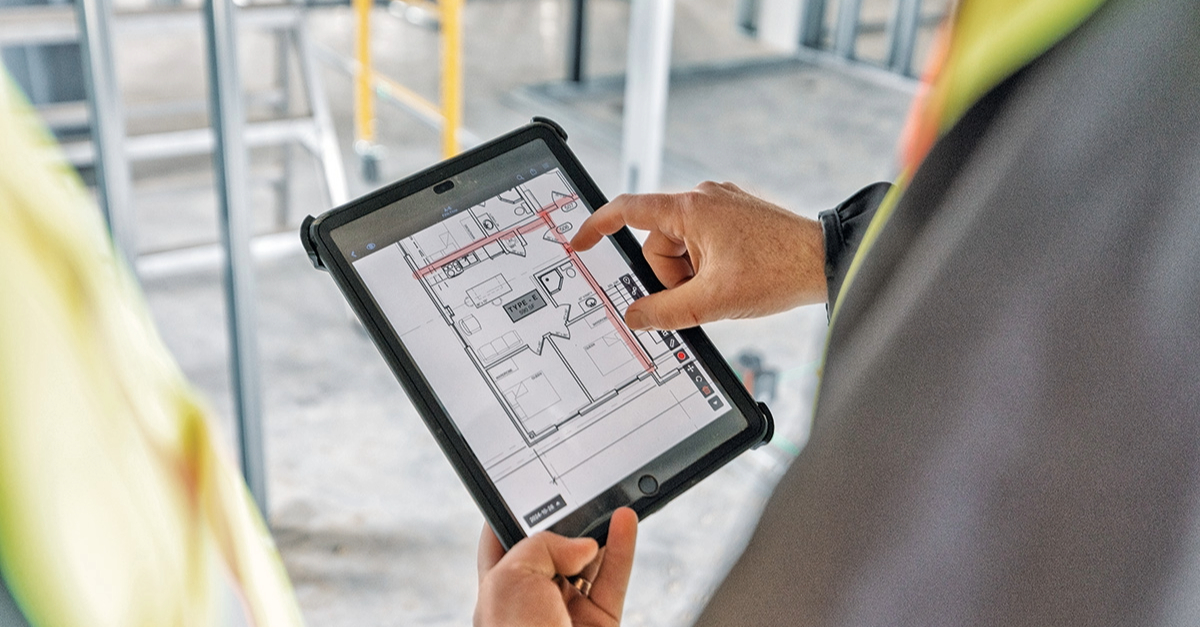
A mechanical foreman roughed in ductwork from a drawing revision that was two weeks old. The updated set, which moved a structural beam right through that run, was in someone's email but never made it to the field.
The ductwork was removed, the updated routing was refabricated, and the work behind it pushed by a week. That's the kind of rework construction document management software is built to prevent.
Below we dive into what software like this does, why many tools miss the mark for small contractors, what to look for, and six platforms to evaluate in 2026.
What this article covers:
- What construction management software actually does
- Why the benefits show up on your job costs
- How it differs from full construction management software
- Why most platforms fail small contractors
- What to prioritize when shopping
- The six platforms worth evaluating
- How long rollout takes on a small team
- How to make the final pick
Construction document management software keeps teams on the current set
Construction document management software is a digital platform built to help organize, version-control, and share documents that drive how a project gets built.
A critical function is version control. The software tracks revisions so teams are always working off of the latest version. Many platforms also manage requests for information (RFIs), submittals, change orders, specs, punch lists, daily reports, and site photos in one accessible location.
For a small contractor, the core value is simple: every person on the crew sees the same current information.
Document management software reduces rework and saves field time
The benefits show up directly on job cost reports.
-
You stop paying for rework caused by bad information. Direct rework typically runs between 2% and 20% of a project's contract amount. For instance, a 4% to 6% rework rate on a $500,000 project would equal $20,000 to $30,000 in direct losses.
-
Your crew spends less time hunting for information. Field teams often lose time looking for project information, correcting mistakes, and resolving conflicts that should have been answered by accessible documentation.
-
You gain a competitive edge most contractors don't have yet. Construction technology adoption is uneven across the industry, so a small team running disciplined digital document control still operates ahead of many peers.
-
You build a paper trail that protects you. Easily accessible plan markups and daily log photos can support your position during disputes, warranty claims, and lien waivers.
Together, these effects move the needle on margin in ways a feature list alone won't capture.
Document management handles control; construction management covers broader workflows
Document management software handles the information your project runs on: drawings, RFIs, submittals, change orders, specs, and daily reports. Construction management software includes that, plus broader operational functions such as estimating, project cost management, contract management, field execution, safety, quality, and virtual design and construction. Many small contractors start with document control and add broader tools as they grow.
Most document management platforms fail small contractors because they are too heavy to roll out
The failure rate with construction software is mostly a fit problem.
-
The software doesn't match how you actually work. Many construction leaders cite poor fit with current processes as a top reason new technology fails to stick. Software built for dedicated document control teams caters to high RFI and submittal volumes and requires a dedicated administrative staff. A small mechanical contractor running a much lighter document workflow has very different needs that don't always map to enterprise systems.
-
Your field crew never got a vote. Most contractors agree that the people on the jobsite should drive technology decisions, but far fewer actually gather feedback from the field before purchasing. That buy-in matters because field adoption suffers when the end users get no direct benefit from using software that they had no input in selecting.
-
You don't have six months to roll it out. Setup and training time is consistently named as one of the largest IT challenges for contractors. Office-heavy platforms often require weeks of configuration, folder structures, and training before anyone sees value. Small project teams may not have that time to spare.
If a tool ignores any of these three realities, adoption stalls and the spend goes to waste.
Small contractors should prioritize mobile access, version control, and fast rollout
Given those failure modes, prioritize tools your crew will actually use over tools with the longest feature list.
-
Mobile-first with true offline mode. Field teams need access to drawings, RFIs, and daily logs without reliable internet. No cell signal sends crews back to paper if the app can't keep working in a basement or on a rural site.
-
Automatic version control. The system should clearly track revisions and flag superseded versions so nobody builds from an outdated set.
-
10-minute onboarding. Adoption barriers include steep learning curves and poor fit with site practices. If a 55-year-old foreman can't figure it out on his phone in 10 minutes, it won't get adopted.
-
Transparent pricing you can budget before a sales call. Transparent pricing is a key criterion for value-focused small contractors. If you can't see a price without first sitting through a demo, budget higher than the marketing materials suggest.
A tool that hits these four marks is one your crew is likely to keep using after week one.
Six document management platforms worth evaluating in 2026
The right pick depends on your crew size, project type, and which pain point costs you the most money right now.
The six platforms below were selected because each one is widely used in the U.S. construction market, supports core document management workflows (or excels at a specialized adjacent capability like markup or daily reporting), and serves a clearly different buyer profile from the others. Pricing, feature tiers, and "best for" notes reflect publicly available vendor information at the time of writing; verify current pricing with each vendor before committing.
Quick comparison
| Platform | Best for | Free plan | Starting paid price | Mobile and offline |
|---|---|---|---|---|
| Fieldwire by Hilti | Small and growing trade contractors | Yes (5 users, 3 projects, 100 sheets) | $39/user/month (Pro) | Yes |
| Procore | Mid-to-large general contractors | No | Custom (Annual construction volume-based) | Yes |
| Autodesk Forma | BIM-focused, Autodesk-native teams | Free with eligible AutoCAD, Revit, or Civil 3D subscriptions | Custom | Yes |
| Buildertrend | Residential builders and remodelers | No | Custom | Yes |
| Raken | Field-to-office daily reporting | No | Custom | Yes |
| Bluebeam Revu | Office-side markup, takeoffs, plan review | No | $260/user/month (Basic) | Limited (Windows-first) |
Fieldwire is the best fit for small, field-first trade contractors
Fieldwire is a field-first jobsite management platform built for mobile and day-to-day work on the jobsite. It centralizes plan viewing with automatic version control, task management tied directly to drawing locations, punch lists, and full mobile offline functionality. The free Basic tier supports up to five users and three projects.
Key features
Offline plans and tasks keep crews working from current drawings, tasks, and photos. Automatic sheet versioning helps teams identify and work from the latest drawing set. The sheet compare function overlays old and new revisions to highlight changes.
Pros
- Streamlined document management is one of Fieldwire's core focuses
- Mobile experience designed for use directly on the jobsite
- Free Basic tier with zero cost for up to five users
Cons
- Performance can lag with very large files or many simultaneous tasks
- RFIs, full submittal management, and change orders require Business Plus, though the submittal extractor is available on Pro and above
- Advanced reporting and customization limited for complex workflows
Pricing
Basic is free for up to five users and three projects. Paid plans bill annually: Pro at $39/user/month, Business at $64/user/month, Business Plus at $89/user/month. See Fieldwire's pricing page for the current tier breakdown and feature inclusions.
Best for
Small and growing trade contractors and field-heavy teams that need crews productive fast without an IT department.
Procore fits larger GCs with complex, multi-party workflows
Procore is a full construction management platform covering document control, RFIs, submittals, budgeting, and financial management. All plans include unlimited users and storage.
Key features
Document repository centralizes blueprints, contracts, permits, and communication records with granular access controls. RFI workflows track requests from creation through response with automated notifications. Drawing management includes version control and markups.
Pros
- RFI management reduces confusion from email threads and spreadsheets
- Supports integrations listed in Procore's marketplace
- Unlimited users on all plans removes per-seat budget and user access concerns
Cons
- Custom pricing tied to annual construction volume, with no published tiers
- Steep learning curve for subcontractors and field teams
- Setup and customization can overwhelm small teams without dedicated admin staff
Pricing
Custom quotes based on annual construction volume. Contact Procore directly for current pricing.
Best for
Mid-to-large sized general contractors managing complex, multi-party projects with significant construction volume.
Autodesk Forma fits teams already standardized on Autodesk tools
Autodesk Forma includes data management and design-to-construction collaboration tools for AECO teams. Within Forma, Forma Data Management handles document storage and version control. PlanGrid has been discontinued for new customers.
Key features
Document storage and version control support markups on drawings and models, plus issue tracking with reviews and approvals workflows. Deep integration with AutoCAD, Revit, and Civil 3D.
Pros
- Forma Data Management Essentials is included with standalone AutoCAD, Revit, or Civil 3D subscriptions
- AI-powered RFI creation and automated drawing extraction
- Design-to-field continuity for teams standardized on Autodesk tools
Cons
- Pricing can be costly for smaller companies
- Initial setup is complex for small projects
- PlanGrid discontinuation forces former PlanGrid users to migrate to Forma Build or another platform
Pricing
Forma Data Management Essentials is free with standalone AutoCAD, Revit, or Civil 3D subscriptions. Full Forma Build is sold per user per month and varies by configuration; confirm current pricing directly with Autodesk before budgeting.
Best for
BIM-focused subcontractors and design-build teams that are already invested in the Autodesk ecosystem.

Buildertrend is built mainly for residential builders and remodelers
Buildertrend is a residential construction management platform built for home builders, remodelers, and specialty contractors. It includes client portals, digital signatures, and audience-separated comment channels.
Key features
File storage and version history combine with permission-based sharing and audience-separated portals for clients and subcontractors. Digital signatures handle approvals without in-person meetings. Daily logs and change orders track progress and scope changes from the field.
Pros
- Unlimited users and projects on all plans
- Purpose-built for residential builder workflows, including client-facing portals
- Client portal with digital signatures simplifies remote approvals
Cons
- Residential-first focus may not align with commercial trade contractor workflows
- Submittal log management is not prominently documented as a standard feature on public product pages
- Pricing is no longer published; quotes require a sales conversation
Pricing
Buildertrend pricing is provided via custom quotes rather than published tiers. All plans are advertised as including unlimited users and projects.
Best for
Best suited to residential builders and remodelers rather than most commercial specialty contractors.
Raken fits teams focused on daily reporting from the field
Raken is a cloud-based construction management software designed to streamline field-to-office communication, documentation, and reporting.
Key features
Daily report PDFs are generated automatically. Photo and video attachments sync in real time from field to office with offline functionality. The Performance plan adds time tracking, safety checklists, and production tracking.
Pros
- Purpose-built for non-technical crews and easy for field workers to pick up
- Automated reporting is available on certain plans
- Offline functionality keeps field documentation moving with no cell signal
Cons
- Document storage, RFIs, and digital forms are reserved for higher-tier plans
- No submittals or drawing management at any tier
- A user minimum may apply, which raises the entry cost for very small crews
Pricing
Raken pricing is not publicly published in full. Confirm current plan tiers, per-user costs, and any user minimum directly with Raken before budgeting.
Best for
Contractors whose primary need is field-to-office daily reporting with minimal tech resistance.
Bluebeam Revu works best for office-side markup and drawing review
Bluebeam Revu is a desktop application focused on PDF markup, measurement, and document management for AEC workflows that operates natively on Windows. It is positioned well for primary use in the office rather than out on the jobsite with field crews.
Key features
PDF annotation and overlay comparison support customizable markups and stamps. Batch Slip Sheet automatically matches new drawing revisions with current sheets. Studio Sessions enable real-time collaborative markup. Measurement tools support perimeter, volume, and count calculations for takeoffs.
Pros
- Long-established product in AEC plan review and markup workflows
- Batch Slip Sheet automates revision matching across large drawing sets
- Role-based tier assignments let organizations pay only for the features each user needs
Cons
- Windows-first; the native iPad app has been retired
- No resource or field operations management
- Subscription-only pricing
Pricing
Subscription-only, billed annually per user across three tiers (Basics, Core, Complete). Confirm current per-user pricing with Bluebeam, as published rates change periodically. Organizations can assign different tiers to different users based on role.
Best for
Project managers, estimators, and office-side teams handling plan review, takeoffs, and design markup. Pair with a dedicated field platform for jobsite crews.
Small teams can usually roll out document management software in four to eight weeks
For a team of five to 25 people, four to eight weeks is a reasonable timeline for software rollout Start with one active project and two to three willing field users, upload drawings, and expand once the field team begins adopting. Treat the timeline as a planning guide rather than a hard benchmark; actual rollout speed depends on project complexity, existing workflows, and how quickly the field team takes ownership.
Choose the platform that solves your biggest field coordination problem first
The right software is the one your field crew actually uses, not the one with the longest feature list.
Start your evaluation by identifying the single pain point that costs you the most money. If outdated drawings cause rework, prioritize version control. If your office spends hours chasing daily reports, prioritize field-to-office reporting. If you need full financial visibility across large projects, a broader construction management platform may be the right fit. Match the tool to the problem before comparing feature lists.
If Fieldwire looks like the right fit, the free Basic plan lets you test it on a live job before you commit to a paid tier.
Frequently asked questions about construction document management software
You can, until your crew builds from an outdated drawing. The break-even point is when the cost of one rework event exceeds the annual cost of the software.
Costs vary widely. Fieldwire's Basic plan is free for up to five users, with paid tiers starting at $39/user/month. See Fieldwire's pricing page for current details. Some platforms require a sales conversation for current pricing.
The most common adoption advice from contractors who have done it: choose a platform that works on a phone without training and works offline, and start with a small group of willing users on one live project before expanding.


