
What is the best PlanGrid alternative and how to migrate your projects to new construction software

PlanGrid had earned its reputation as a mobile-friendly plan viewer with great customer support, continuous innovation, and personalized pricing. But, after it was acquired by Autodesk, PlanGrid is no longer sold as a standalone product.
Autodesk now directs new users to Autodesk Build, part of the Autodesk Construction Cloud, which incorporates and extends the core capabilities originally provided by PlanGrid. While this promises a more integrated ecosystem, it also raises important questions for teams who love PlanGrid’s simplicity.
For existing PlanGrid users, the move to Autodesk Build can feel inevitable, but it doesn’t have to be. This is the perfect time to reassess what your team actually needs in the field and find a jobsite management platform that genuinely fits your needs.
Summary
While Autodesk Build offers an integrated ecosystem, it introduces complexity, higher costs, and migration challenges for PlanGrid users. This transition is an opportunity for construction teams to reassess their needs and consider alternatives like Fieldwire, which provides ease of use and transparent pricing.
Takeaways:
- Autodesk Build it’s a more complex and costly platform than PlanGrid, with a steep learning curve.
- Data transfer isn’t automatic; expect manual cleanup, workflow changes, and potential downtime.
- Autodesk Build can become expensive due to bundled features and upselling of the full suite.
- Fieldwire is an alternative that offers intuitive design and fast onboarding for construction teams.
Want to see how easy it is to migrate your projects to Fieldwire? Schedule your migration call now.

How moving from PlanGrid to Autodesk can impact your teams
Autodesk Build isn’t just an upgrade: it’s a completely different platform. It combines document management, cost tracking, scheduling, and BIM tools into one giant suite. For some, that’s great. For others, it means complexity, higher costs, and a steep learning curve.
And then there’s the migration. Moving years of project data isn’t easy. Even with Autodesk’s migration tools, some markups and custom fields may not transfer perfectly. Historical data might need manual review, and workflows will change to fit Autodesk’s processes.
Here are some challenges your teams may face while migrating from PlanGrid to Autodesk Build:
Slower adoption
Because Autodesk Build is more complex, it presents a steeper learning curve that can slow down field adoption. And while extra features sound appealing, many contractors end up with a bulky system packed with tools they’ll never use — and the hefty price tag that comes with it. This is especially true for subcontractors whose main needs for software are focused on field management.
Higher pricing & extra costs
Autodesk Build is part of the Autodesk Construction Cloud, which can become costly depending on the features and modules you activate. Since Autodesk sales reps often promote the entire ACC suite, you may find yourself pushed toward features that aren’t essential to your workflow, potentially increasing the investment. That’s why it’s important to stick to jobsite management software that supports your real day-to-day work, rather than paying for features you won’t use.
Migration issues
Even with Autodesk’s built-in migration tools, the transition won’t be seamless. Certain data types — markups, custom fields, historical annotations, and other nuanced project details — may not transfer perfectly and require manual cleanup.
And once the data is in, your workflows will still need to be reworked to fit Autodesk’s more intricate system. Ultimately, expect added time, additional training demands, and periods of reduced productivity during the switch.
What to look for in a jobsite management software
Choosing the right construction management software can transform your operations: your teams can collaborate better, communicate in real-time, avoid mistakes, and be more productive.
A well-designed app helps reduce resistance to change, and makes adoption quicker and easier.
Key factors to consider when choosing a jobsite management app:
- Ease of use: Look for a user-friendly interface with mobile and desktop access to simplify onboarding and reduce the learning curve.
- Free trial or pilot program: Test the app with a small team or project before full rollout to ensure it meets your needs.
- Core features: Prioritize features like plan viewing, task management, and real-time notifications.
- App integrations: Ensure the software integrates with your other apps for seamless data synchronization across platforms.
Looking for an alternative to PlanGrid and Autodesk? Meet Fieldwire
You can avoid the potential challenges of the Autodesk Build migration by choosing an alternative that offers the same level of usability and support your teams are already accustomed to.
Fieldwire is an intuitive platform that makes collaboration between field and office seamless, ideal for contractors looking for a reliable, simple solution to manage their projects.
Fast onboarding
Reduce the learning curve by choosing an easy-to-use plan viewer that has all the benefits from PlanGrid without the complexity of Autodesk Build. Fieldwire’s intuitive interface makes it easy for both field and office teams to adopt, whether they’re using a phone, tablet, or desktop. Get your teams up and running in just a few days, without the need of extensive training.
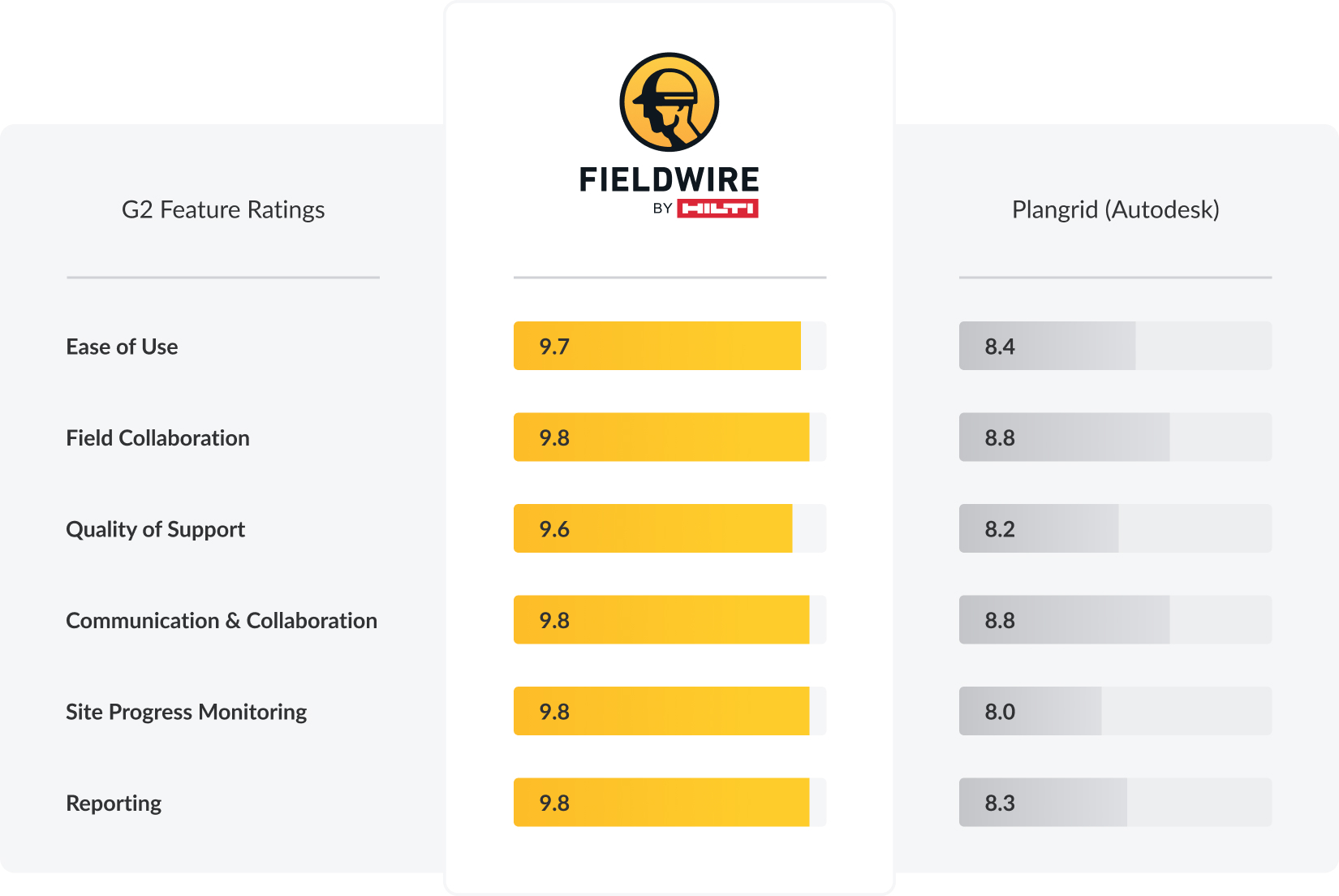
According to G2 reviews from 2024, Fieldwire's Ease of Use score of 9.7 is a significant advantage, while Autodesk Construction Cloud scores 8.4 in the same category. When it comes to Ease of Setup, Fieldwire is rated at 8.7, against 7.9 for Autodesk.
Features that matter
Fieldwire delivers the essential tools construction teams rely on every day: plan viewing, task management, punch lists, reports, and more. You can also manage RFIs and Changes Orders, and view and compare 3D models — if that’s something your teams really need. And because Fieldwire works reliably offline, field teams can stay productive even in areas with limited connectivity.
Transparent pricing
Fieldwire offers four different plans — Basic, Pro, Business and Business Pro — made to adapt to your needs, and to easily scale when needed. Our pricing is fully transparent, so you know exactly what to expect.
How to migrate from PlanGrid to Fieldwire
Migrating from PlanGrid to Fieldwire is simple and stress-free. Our teams designed an easy process with clear steps so you can transfer all your projects’ data safely. Fieldwire’s Customer Success team will guide you every step of the way to ensure a smooth transition, so your crews can keep working without downtime.
We know migration can feel overwhelming. That’s why Fieldwire offers a no-obligation Proof of Concept, so your company can familiarize itself with our mobile and desktop apps before committing to a jobsite management solution. A dedicated Fieldwire representative will ensure your teams are onboarded quickly, and will be available to answer every question you may have.
Fieldwire’s Switch Guarantee Package:
- No-obligation Proof of Concept
- Expedited training with our Customer Success team
- Fast deployment with zero downtime
Ready to make the switch?
Don’t let uncertainty slow you down. Schedule a demo today and see how simple migration can be with Fieldwire. Our team will guide you every step of the way, so you can move forward with confidence. Ready to move now? Get free, personalized migration help.


