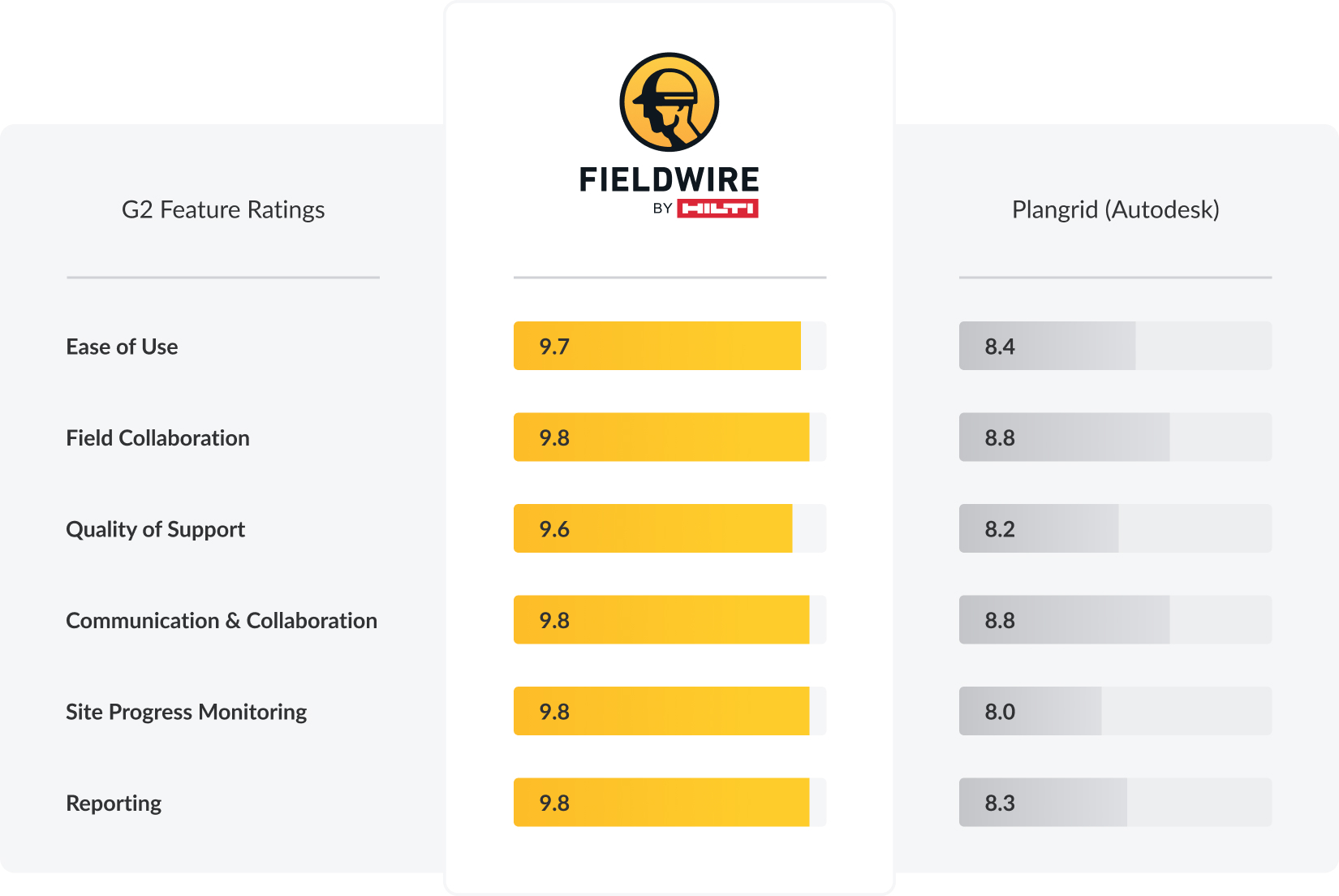
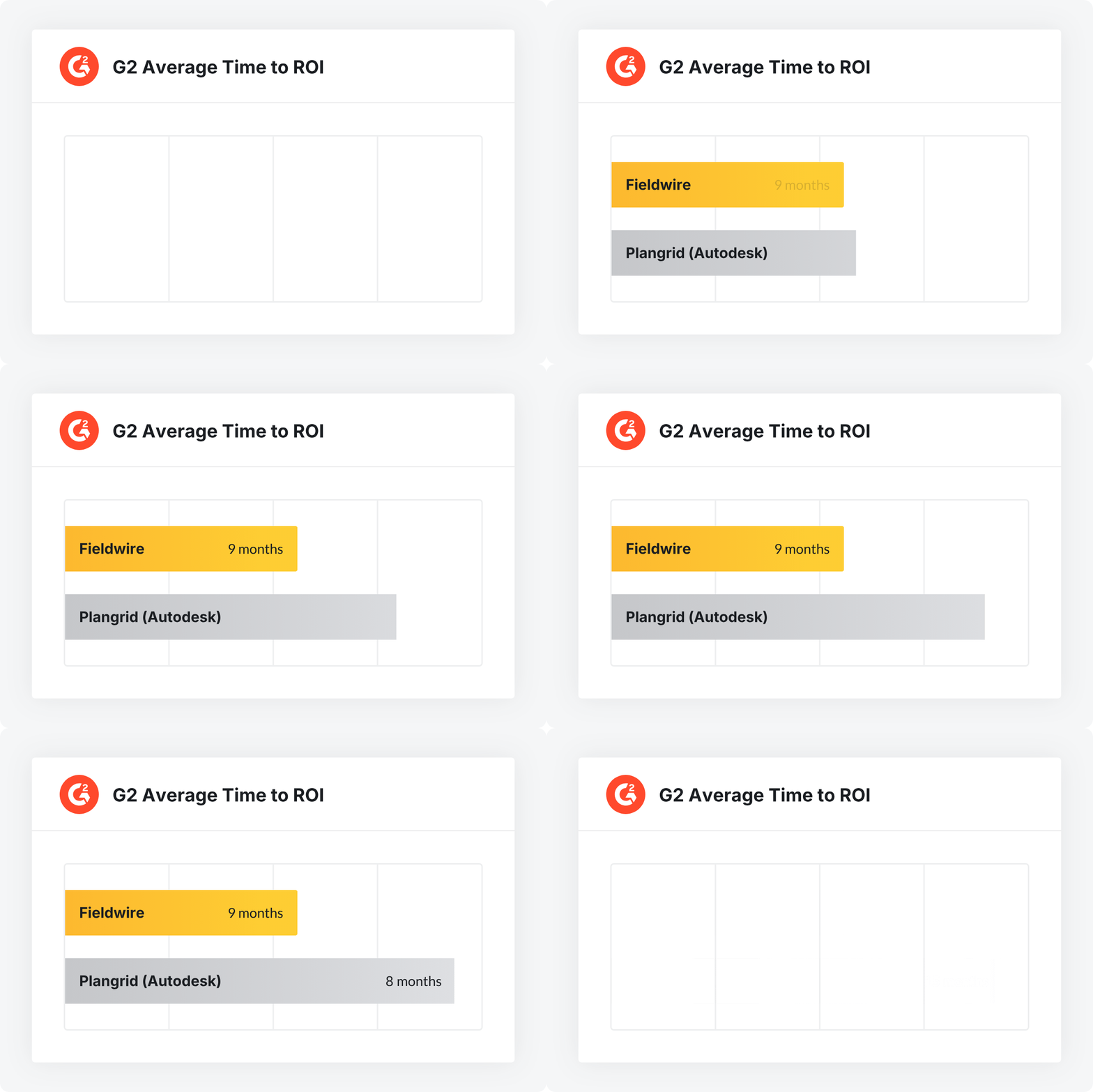
Top PlanGrid alternatives for construction field teams

Top PlanGrid alternatives for construction teams

PlanGrid is gone. Autodesk has discontinued it as a standalone product and is routing existing customers into Autodesk Build, which is a heavier, pricier platform built around the full Autodesk Construction Cloud. For field crews who picked PlanGrid because it was simple, mobile-first, and worked in a basement without a signal, that's a real problem.

If you're being pushed toward Autodesk Build and it doesn't feel like the right fit, you have options. This article compares the four PlanGrid alternatives construction teams are actually evaluating in 2026 (Fieldwire, Autodesk Build, Procore, and Raken) so you can pick the one that matches how your crews actually work.

What this article covers:

  • Why PlanGrid's shift to Autodesk Build is forcing existing users to reevaluate their options.
  • What to expect from Autodesk Build's migration: a steeper learning curve, manual data cleanup, and potential downtime.
  • Where Autodesk Build's costs can climb, with bundled features and upselling toward the full suite.
  • How Fieldwire compares as a PlanGrid alternative, with an intuitive interface and fast onboarding for construction teams.

Want to see how easy it is to migrate your projects to Fieldwire? Schedule a call.

What is PlanGrid?

PlanGrid was a construction productivity software founded in 2011 and built around a simple, compelling idea: give field crews a way to access and mark up blueprints on a tablet without hauling around rolls of paper. It quickly became one of the most popular plan viewers in the industry, particularly among specialty contractors, including electrical, mechanical, plumbing, and civil teams who needed something they could actually use on a jobsite without reading a manual.

What made PlanGrid stand out was its mobile-first design. Field crews could pull up the latest drawing revisions, add markups, and see updates pushed from the office in near real-time. It worked offline, it was fast, and the interface was clean enough that even crews who weren't tech-savvy could figure it out in minutes. For a long time, "PlanGrid" was practically synonymous with "construction app that works for you."

Autodesk acquired PlanGrid in 2018 for approximately $875 million, according to Business Insider, and the standalone product has since been folded into Autodesk Construction Cloud. New accounts can no longer sign up for PlanGrid directly; the product as it existed is effectively discontinued. Existing users have been or are being migrated toward Autodesk Build, Autodesk's full-suite construction management platform.

PlanGrid software: what teams loved (and what changed)

Understanding what made the original PlanGrid software valuable helps explain why so many teams are now actively searching for PlanGrid alternatives rather than simply accepting the Autodesk Build migration.

What crews loved about PlanGrid:

  • Simple plan viewing and version control: Uploading a new drawing set automatically versioned plans and notified field teams. No confusion about which revision was current.

  • Fast, reliable offline access: On job sites with spotty cellular coverage, like underground, in concrete cores, or in mechanical rooms, PlanGrid still worked. Plans were cached locally so crews with gloved hands could pull up a detail without waiting for a signal.

  • Markup tools built for the field: Basic but effective. Annotate a drawing, tag a team member, assign a task. Most foremen could pick it up in a single shift.

  • Punch lists and RFIs: Straightforward enough that a foreman could run a punch list walkthrough with just a phone.

  • Reasonable, predictable pricing: PlanGrid's per-seat or per-sheet pricing model was easy to understand and budget for.

The real benefits of construction management software for field-first contractors

What changed under Autodesk

The software itself has been progressively merged into the broader Autodesk Build environment. Features that once lived in a single, focused app are now distributed across modules and workflows designed for a much larger platform. The field-first simplicity that made PlanGrid feel built for crews has largely given way to a more enterprise-oriented, office-focused toolset.

For specialty contractors, small-to-mid-size GCs, and field-heavy crews, the trade-off often doesn't make sense. They're being asked to pay more, learn more, and manage more, just to do the same things they were already doing in PlanGrid.

PlanGrid pricing: what it costs now under Autodesk

One of the most common questions from teams evaluating their options is straightforward: what does PlanGrid cost now?

The short answer is that PlanGrid pricing no longer exists as a standalone line item. Since Autodesk has discontinued PlanGrid as an independent product, access to its core functionality now comes through Autodesk Build or the broader Autodesk Construction Cloud. Pricing for these platforms is not publicly listed and typically requires a direct quote from an Autodesk sales representative.

For many construction teams, the move from PlanGrid's predictable pricing to Autodesk's modular, enterprise pricing structure has meant higher costs, particularly for smaller teams or specialty contractors who only need field management functionality. The push toward the full ACC suite means you may end up paying for cost management, BIM coordination, and analytics tools that your field crews will never open.

This pricing opacity is one of the primary reasons teams start looking at PlanGrid alternatives. If you already know what you need (plans, tasks, punch lists, RFIs), paying for a platform ten times the size doesn't make sense.

How the move from PlanGrid to Autodesk can impact your teams

Autodesk Build isn't just an upgrade: it's a completely different platform. It combines document management, scheduling, BIM, and other construction workflows into one large suite. For some, that's great. For others, it means complexity, higher costs, and a steep learning curve.

And then there's the migration. Moving years of project data isn't easy. Even with Autodesk's migration tools, some markups and custom fields may not transfer perfectly. Historical data might need manual review, and workflows will change to fit Autodesk's processes.

Here are some challenges your teams may face while migrating from PlanGrid to Autodesk Build:

Slower adoption

Because Autodesk Build is more complex, it presents a steeper learning curve that can slow down field adoption. G2 reviewers report that former PlanGrid users miss capabilities post-migration, and that the broader Autodesk Build environment isn't a one-to-one replacement for what crews knew. Extra features sound appealing, but some contractors end up with a system that includes tools they do not plan to use, alongside the hefty price tag that comes with it. This is especially true for software for subcontractors, whose main needs are focused on field management.

Higher pricing and extra costs

Autodesk Build is part of the Autodesk Construction Cloud, which can become costly depending on the features and modules you activate. Since Autodesk sales reps often promote the entire ACC suite, you may find yourself pushed toward features that aren't essential to your workflow, potentially increasing the investment. That's why it's important to stick to jobsite management software that supports your real day-to-day work, rather than paying for features you won't use.

Migration issues

Even with Autodesk's built-in migration tools, the transition won't always go smoothly. Certain data types — markups, custom fields, historical annotations, and other nuanced project details — may not transfer perfectly and require manual cleanup.

And once the data is in, your workflows will still need to be reworked to fit Autodesk's more intricate system. Expect added time, additional training demands, and periods of reduced productivity during the switch.

Online PlanGrid and connectivity concerns

PlanGrid's offline reliability was a cornerstone of its field value. Teams working in areas without reliable connectivity (basement slabs, remote civil projects, interior mechanical spaces) relied on it daily. As the platform has moved toward Autodesk Build's more web-dependent architecture, some teams may have questions about whether the same offline reliability carries over to Autodesk Build workflows. For crews who rely on cached plans during connectivity gaps, this is a practical, day-one concern worth investigating before committing to any platform, including Autodesk Build.

What to look for in jobsite management software

Choosing the right construction management software can change how your operations run day to day: better collaboration, real-time communication, fewer mistakes, and more productive crews. A well-designed app also reduces resistance to change, and makes adoption quicker.

Key factors to consider when choosing a jobsite management app:

  • Ease of use: Look for a user-friendly interface with mobile and desktop access to simplify onboarding and reduce the learning curve.

  • Free trial or pilot program: Test the app with a small team or project before full rollout to make sure it meets your needs.

  • Core features: Prioritize features like plan viewing, task management, and real-time notifications.

  • App integrations: Make sure the software connects with your other apps so data stays consistent across platforms.

  • Offline functionality: Verify that the platform works reliably without a signal, especially important for trades working in areas with limited connectivity.

  • Transparent pricing: Avoid platforms that require a sales call just to understand what you'll pay. Predictable costs matter for project budgeting.

Top PlanGrid alternatives for construction teams

If you're evaluating alternatives to PlanGrid (whether because you're being pushed toward Autodesk Build or because you're simply reassessing your stack), here's an honest look at the main options teams are considering.

Fieldwire (best for field crews and specialty contractors)

Fieldwire is a direct alternative to PlanGrid for teams who want a field-first, mobile-optimized platform without the overhead of a full enterprise suite. It was purpose-built for construction crews doing real work on jobsites, with active customers across electrical, mechanical, plumbing, civil, fire protection, façade, solar, and low voltage trades.

Where Fieldwire stands out as a PlanGrid alternative:

  • Minimal training needed: The interface is intuitive enough that a foreman can pick it up the same day and be productive.
  • True offline functionality: Plans and tasks sync locally so field crews can keep working in dead zones, underground, or in areas with intermittent LTE.
  • Transparent pricing: Four clearly priced plans (Basic, Pro, Business, Business Plus) with no hidden modules or upsell pressure.
  • Backed by Hilti: Fieldwire is part of the Hilti Group, giving it the stability and R&D investment of a major construction industry company while maintaining transparent tiered pricing.
  • Customer Success-led migration: Fieldwire's Customer Success team supports the transition with structured onboarding, a pilot or demo before you commit, and direct support throughout the rollout.

Autodesk Build (best for large GCs already in the ACC ecosystem)

Autodesk Build is the default landing point for teams with existing Autodesk investments, particularly large GCs running complex projects who need BIM coordination, cost management, and document control in a single platform. If your team is already running Revit, BIM 360, or other Autodesk tools and has the IT resources and training budget to support a full-suite rollout, the migration path is the lowest-friction option Autodesk offers.

For specialty contractors or smaller teams, it's typically more platform than the work requires. G2 reviewers consistently flag that markup tools are less powerful than dedicated PDF software, sheet navigation can feel slow, and former PlanGrid users report missing capabilities post-migration. Teams that valued PlanGrid's simplicity often find the broader Autodesk Build environment a poor match for how their crews actually work — which is the reason this article exists.

Procore (best for office-heavy, enterprise project management)

Procore is a construction management platform with strong financial management, owner portal, and subcontractor coordination features. It's widely used by large GCs and owners who need robust project controls.

The trade-off is that it's designed more for the office than the field. Verified Capterra reviewers commonly flag pricing as a barrier for smaller contractors, and the learning curve is steep enough that field-only crews often find the interface heavy for day-to-day use. Pricing is opaque and ACV-based, requiring a sales engagement to get a number — a similar dynamic to what teams are trying to move away from when leaving the Autodesk Build path.

Raken (best for daily reports and field logs)

Raken is a focused option if your primary need is daily reporting, time tracking, and field logs. It's easy to use on a phone and has solid toolbox talk and safety documentation features.

It isn't a full plan viewer or task management platform, though. G2 reviewers note that plan markup and task management are limited compared to dedicated field execution tools, and the platform doesn't ship with RFIs, drawing management, or punch lists in its base configuration. That makes Raken a useful complement to other tools rather than a standalone PlanGrid replacement — teams that try to use it as a one-to-one swap typically end up running a second tool alongside it within the first few months.

Looking for an alternative to PlanGrid and Autodesk? Meet Fieldwire

You can sidestep the headaches of the Autodesk Build migration by choosing a tool that gives your teams the same kind of usability and support they're used to. Fieldwire is an intuitive platform for collaboration between field and office, built for contractors who want a reliable, simple way to manage their projects.

Fast onboarding

Reduce the learning curve by choosing an easy-to-use plan viewer that offers many of the field-friendly benefits teams valued in PlanGrid, without the complexity of Autodesk Build. Fieldwire's intuitive interface works the same way for both field and office teams, whether they're using a phone, tablet, or desktop. Most teams get up and running in days, not weeks, without extensive training.

Features that matter

Fieldwire delivers the tools construction teams rely on every day: plan viewing, task management, punch lists, reports, and more. You can also manage RFIs and Change Orders, and view 3D models if your teams really need that. And because Fieldwire works reliably offline, field teams stay productive even in areas with limited connectivity.

For specialty contractors in particular, including electrical, mechanical, fire protection, façade, and solar crews, the ability to pull up a drawing revision, flag a conflict, and assign a task from a phone without needing a Wi-Fi connection is the difference between catching rework before it happens and discovering it during inspection.

Transparent pricing

Fieldwire offers four different plans (Basic, Pro, Business, and Business Plus) built to adapt to your needs and scale as you grow. Their transparent pricing shows you exactly what to expect.

How to migrate from PlanGrid to Fieldwire: a step-by-step guide

Migration doesn't have to be the disruptive event teams fear. Done in the right sequence, it's a contained project: a few weeks of preparation, a pilot, then a phased rollout. Here's the practical path most construction teams follow when moving from PlanGrid to Fieldwire.

Step 1: Audit your current PlanGrid setup

Before exporting a single file, take stock. Pull a list of active and archived projects, count active users, and identify which sheet sets, RFIs, punch lists, and task workflows are still in use. Note any custom statuses, tags, or naming conventions your teams rely on. The goal is to know what actually needs to move and what can be archived.

Step 2: Export your project data from PlanGrid

Pull down the data you need to preserve — sheet sets with current revisions, photos, markups, RFIs, punch list items, and task histories. Document any custom fields or workflows you'll want to recreate in Fieldwire. For most teams, this is also a good moment to drop data that's no longer useful: outdated sheet versions, closed punch items from completed projects, inactive user accounts.

Step 3: Map your workflows to Fieldwire

Most PlanGrid concepts have a direct counterpart in Fieldwire — projects, sheets, tasks, RFIs, punch lists. Map them one-to-one, then decide how you want to handle the things that don't translate cleanly: custom tags, sheet versioning conventions, or third-party integrations. Get this on paper before you start importing, so field teams aren't asked to reinvent processes on the fly.

Step 4: Run a pilot on one project

Pick a single active or upcoming project (ideally one with a foreman who's comfortable trying something new) and stand it up in Fieldwire. Import the sheets, set up the tasks and RFIs, and put a small crew on it. The pilot does two jobs at once: it surfaces any data mapping issues while they're still cheap to fix, and it gives you internal proof that the platform works for your specific kind of work.

Step 5: Validate the migrated data

Before scaling up, spot-check the pilot project for accuracy. Confirm sheet versions match what was current in PlanGrid. Check that markups landed in the right place. Verify task assignments, statuses, and any custom fields transferred as expected. Fix any gaps before they're replicated across every project.

Step 6: Train your field teams

Fieldwire's interface is intuitive enough that a foreman can pick it up the same day, but a short, structured walkthrough still pays off. Cover the basics: opening a sheet, creating and assigning a task, marking up a plan, syncing offline. Make sure crews working in areas with limited signal know how to download plans for offline use before they leave the office.

Step 7: Roll out across remaining projects

With the pilot validated and the first crew trained, phase the rest of the rollout by team, region, or project type, whatever fits your operation. Keep read-only access to PlanGrid (or your archived export) for historical lookup during the transition, but set a clear cutover date for each project so there's no confusion about which platform is the source of truth.

Fieldwire's Customer Success team supports every step of this process, from the initial audit through final rollout. A pilot or demo is available before you commit, so your teams can test Fieldwire on a real project before signing.

Ready to make the switch?

For teams who need plan viewing, task management, punch lists, and RFIs in a single mobile-first app (which is most of what PlanGrid delivered), Fieldwire is a close functional fit without the complexity jump.

Don't let uncertainty slow you down. Schedule a demo today and see how migration can work for your team. A Fieldwire representative will walk you through the process, answer your questions, and help you plan a path that fits your projects.

Courtney Bottos

With 7 years of hands-on experience in roles from Project Engineer to Project Manager, Courtney brings a real understanding of the challenges and pressures that construction teams face in the field each day. As a Construction Success Manager at Fieldwire, this experience allows Courtney to help customers create a higher level of efficiency and improve coordination and communication across their project teams.

Get started now

Field service management software for construction

4,000,000+ projects worldwide

Helping the largest construction companies in the world more easily manage their job sites.

Graham UKEllisDonClark ConstructionBuiltClimatec logoBrookfieldCougnaudWebcorJohnson ControlsMorguardBockmon & WoodySutter HealthColt BuildersSpeller MetcalfeGraham