
What specialty contractors should look for in field-built construction software
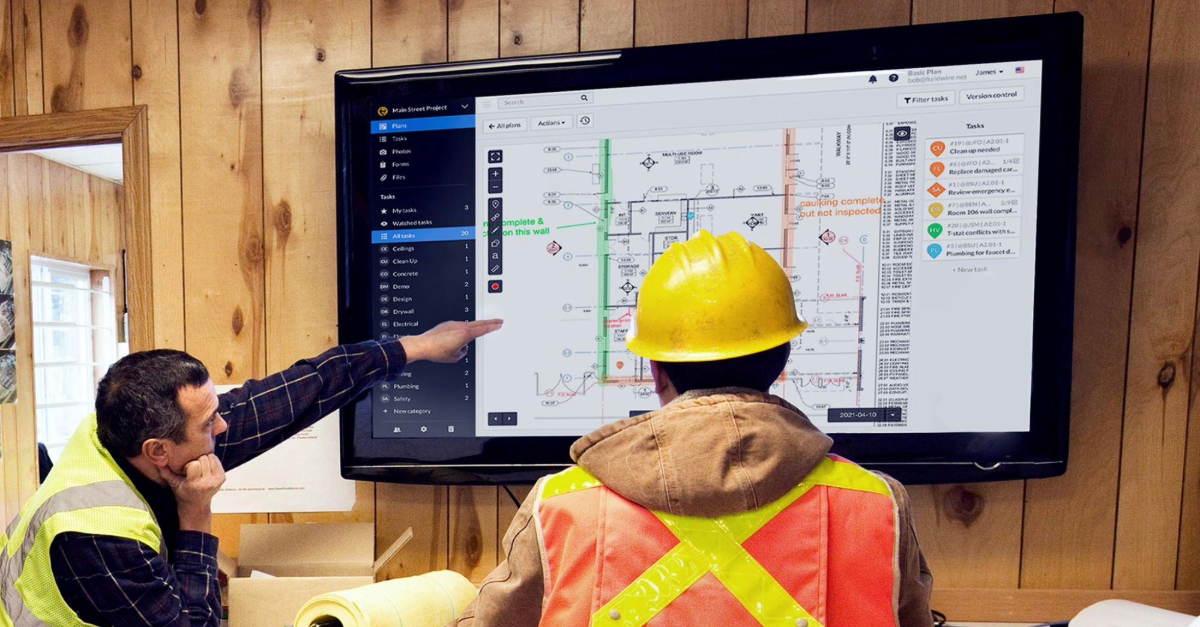
Your electrical foreman pulls up the plans on his tablet mid-install and realizes the conduit routing he's been working from all morning was superseded by a revision issued two days ago. That revision is sitting in someone's email, not on his screen.
This is what happens when specialty contractor software is really just office-first software with a different label on it. That single outdated drawing can trigger rework that cuts into already thin margins on a commercial job. For specialty contractors, one bad revision can cause damage before anyone in the office catches it.
This article breaks down what office-first construction tools get wrong for trade and specialty contractors and what field crews actually need from their software. It also covers how to tell the difference between software built for the field and software that was built for the office and repackaged for everyone else.
Here's what we'll cover:
- Why most construction software is built for the office and where it falls short for specialty contractors in the field
- What field crews actually need from their software: current plans, fast documentation, mobile access, ease of use and offline capability
- Why adoption matters more than features, and how to test for it before you buy
- How working across multiple GCs creates documentation chaos and what to do about it
- The real cost of outdated plans and how version control prevents rework
- Why closeout gets painful when documentation wasn't built along the way
- What to look for in pricing so you're not paying enterprise rates for an office-first tool
What most construction software actually gives you
Most construction software is built for GC workflows first, not specialty contractor field use. The standard bundle covers familiar ground: document management, requests for information (RFIs), submittals, change orders, daily reports, punch lists, and some form of jobsite reporting. On the surface, this looks like a full toolkit. But there's a structural bias in the architecture that the feature list doesn't reveal.
GC-first design. Most construction platforms were built to serve GCs and owners first. The work processes of trade contractors differ from those of GCs, and more focused products are now emerging to cater directly to their needs. That GC-first design isn't a hidden bias. It's baked into the product from the start.
Duplicate systems. When a specialty contractor works on a project using a GC-controlled platform, they're often logging into the GC's system to upload submittals and access drawings. At the same time, they maintain their own separate system for internal management. That often means duplicate data entry across projects.
Admin overhead. For a mid-size mechanical or electrical contractor running several active jobsites across different GCs, the administrative overhead compounds fast. Specialty contractors have often had to bridge these gaps with spreadsheets, text files, and other workarounds to move information between systems.
What field-built specialty contractor software should do
For most of the industry's history, construction technology focused on office-based functions like estimating, project planning, and accounting. The shift now is toward the jobsite, and the software that specialty contractors use should reflect that by starting from the field and working back toward the office. Here's what that looks like in practice:
-
Start from the field, not the office. The foreman and the crew need current plans in hand, clear task assignments tied to locations on those plans, a fast way to document work performed, and the ability to communicate with the office without picking up the phone.
-
Simple, fast interfaces that don't require much training. Training time and implementation burden can become major barriers to adoption. When crews are busy keeping jobs moving, field usability becomes a design requirement, not an afterthought.
-
Mobile-first access. Crews use smartphones and tablets every day. What they actually do with mobile software is basic and practical: field reports, job information access, time tracking, and sharing drawings and photos. Not the advanced features office-first platforms emphasize on their marketing pages.
-
It should work without internet. Connectivity is still a challenge on many jobsites. For field crews working in basements, mechanical rooms, or rural sites, offline capability is a structural requirement that determines whether the software gets used at all.
-
Documentation should happen as work happens. Every time-and-material (T&M) ticket, every delay notice, and every field photo can matter later. The software should let a foreman document work from the field and attach photos, tasks, or notes to a location on a plan, and push it to the office with fewer manual handoffs.
-
Close the field-office gap. Poor reporting between the field and the office creates inefficiencies that put pressure on project margins. When information gets stuck in notebooks, photos, texts, and end-of-day phone calls, the office sees problems too late. Fieldwire, a mobile-first jobsite management platform, helps close this gap. Plans, tasks, photos, and documents captured in the field are accessible to office teams, reducing manual handoffs and version confusion. It requires minimal training, works offline, and updates upload when a connection returns.
Why adoption matters more than features
If crews do not use the software, the feature list does not matter. Field workers are generally more likely to use digital tools that make their work simpler. But companies do not always involve the people who will actually use the software in the buying decision. Field teams commonly reject office-first tools for reasons like these:
- The interface wasn't designed for use on a jobsite
- Too many steps to complete a basic task in the field
- Features they need are buried or missing
- Training requirements are too high for busy crews
- The tool solves office problems, not field problems
Someone in the office picks the tool. The field never gets a say. Within weeks, the crew reverts to texts, calls, and notebooks.
The consequences show up in the work. Poor project information and miscommunication can lead to rework, and among specialty contractors, rework can erode margins enough to change the economics of a job.
That's why adoption matters more than a long feature list. A simpler tool that every crew member actually uses will usually outperform a feature-rich platform that only the PM touches. Fieldwire's approach centers on an intuitive interface that field teams can pick up quickly. Product development also reflects customer input, with the goal of avoiding the adoption trap that kills more complex tools. Fieldwire's reviews page includes customer feedback about jobsite time savings.
Working across multiple GCs creates documentation gaps
Specialty contractors lose documentation continuity when each GC requires a different platform. They work for several simultaneously, each with its own documentation requirements, platform preferences, and approval workflows. When those systems don't talk to each other, information falls through the cracks.
-
Platform sprawl. Each GC may require login to a different system for submittals, drawings, and approvals. Managing access and data across those platforms adds administrative load without adding value.
-
Owner-specific requirements. Different reporting forms, submission timelines, and record-keeping standards from one job to the next make standardization difficult.
-
Missed revenue risk. Paper T&M tickets, disconnected spreadsheets, and slow approval chains cost time and put revenue at risk. When change-related information lives in texts and unsaved photos, one missed change order on a large job can mean lost revenue.
Fieldwire gives teams an independent record. Plans, markups, tasks, and photos are organized in one place, with exportable documentation for inspections, progress, and project records.
Outdated plans increase rework risk
Working from outdated plans drives rework that cuts productivity and margin. Changes, errors, and omissions in design can drive rework costs, and construction deviations add to the problem. When your crews are working from the wrong version of a drawing, the issue may have started upstream, but the cost often lands on the trade contractor.
Field personnel do not always have reliable access to revised drawings or clear information about what and where to build. Among specialty contractors, low-quality design documents and outdated information consistently rank among the top external concerns affecting field productivity. That lost time looking for the right project data compounds the cost of rework itself. Direct rework costs cut into project margins on nearly every job, and indirect effects push the true figure higher. McKinsey research on construction productivity found that waste from poor planning, coordination failures, and rework is one of the industry's most persistent drains, with the sector losing an estimated $1.6 trillion in annual value to inefficiency.
Fieldwire's plan management addresses these issues directly:
-
Automatic version control keeps every team member working from the same source of truth across the app.
-
Sheet compare lets users overlay revisions to spot exactly what changed.
-
Box and Dropbox integrations allow teams to import plans and files into Fieldwire without relying on emailed PDFs.
-
Offline access means when a foreman opens a drawing in the field, they can still access downloaded plans offline.
Closeout gets harder when documentation is not captured during the job
Closeout is easier and faster when documentation is captured during the job instead of reconstructed at the end. Construction businesses wait more than three months on average to collect payment on invoices, and that delay is tied directly to documentation completion and retainage release.
Common closeout pain points include:
-
Tasks required for closeout get put off until the end of the job, even though earlier planning tends to make the process significantly easier to manage.
-
Crews have demobilized, and the people who made the field decisions are on different jobsites.
-
Retainage does not release until punch items, as-builts, and closeout documentation are complete.
-
On large projects, punch work can pile up quickly, and paper-based tracking at that scale is a recipe for missed items and delayed payment.
Fieldwire's punch list and as-built drawing tools let field teams document work as it happens, not months later from memory. Punch items are created directly on plans during walkthroughs, with photos and annotations attached. When closeout arrives, the as-builts and supporting documentation are far easier to pull together.

Pricing models can misalign with specialty contractor teams
Pricing models often penalize specialty contractors because they have more field users than office staff, and that ratio matters when you're paying for software on a per-seat or volume basis.
-
Volume-based pricing is opaque. Some office-heavy construction platforms price based on total annual construction volume managed through the platform, with custom-negotiated contracts that aren't published publicly. Determining the overall volume can be opaque, and final pricing often comes down to direct negotiations where a mid-size specialty contractor has less leverage than a large GC.
-
Enterprise fees for office-led features. Specialty contractors with significant contract volume can end up paying enterprise-level fees for a platform whose feature set was designed for office-led operations.
-
Fieldwire's pricing is published and tiered. Pricing is per-user, with plan details available on the pricing page. The free Basic tier covers up to five users, three projects, and 100 sheets, so small teams can start without a purchase order. Fieldwire pricing starts at $39 per user per month (billed annually).
How to tell if jobsite management software was actually built for the field
Field-built software should be easy for crews to use, keep plans current, and support documentation from the jobsite. That's what Fieldwire was built to do, giving field and office teams a shared view of jobsite activity.
Before you buy, hand the app to a foreman who's never seen it. If they struggle to figure out the basics quickly, adoption is far less likely. And if you need to "contact sales" just to see pricing, expect a number built for opaque enterprise-style purchasing.
The right software gets adopted by crews without a fight, keeps plans current without manual effort, and documents work as it happens. That's what separates software that earns its keep from software that becomes expensive shelfware. If you're evaluating options, Fieldwire's free plan lets your crew test it on a live job before you commit.


